Small-Business Infrastructure & On-Site Deployment Lab
 Saqib Majeed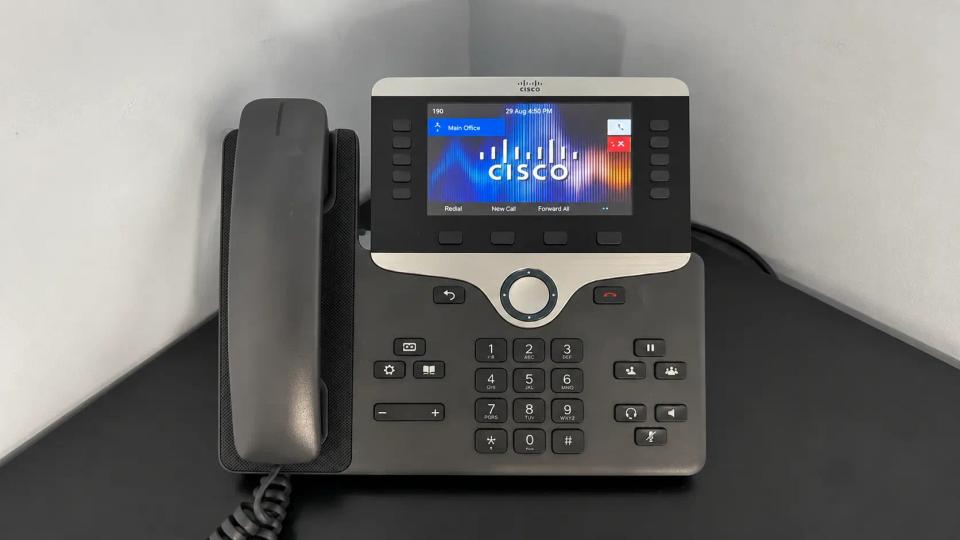
Built and deployed a simulated small-business IT environment with 10+ Windows endpoints, Active Directory, pfSense, VLANs, managed switching, VoIP, and network printers. Practiced end-to-end site deployment, configuration, validation, troubleshooting, rollback, and support procedures.
Overview
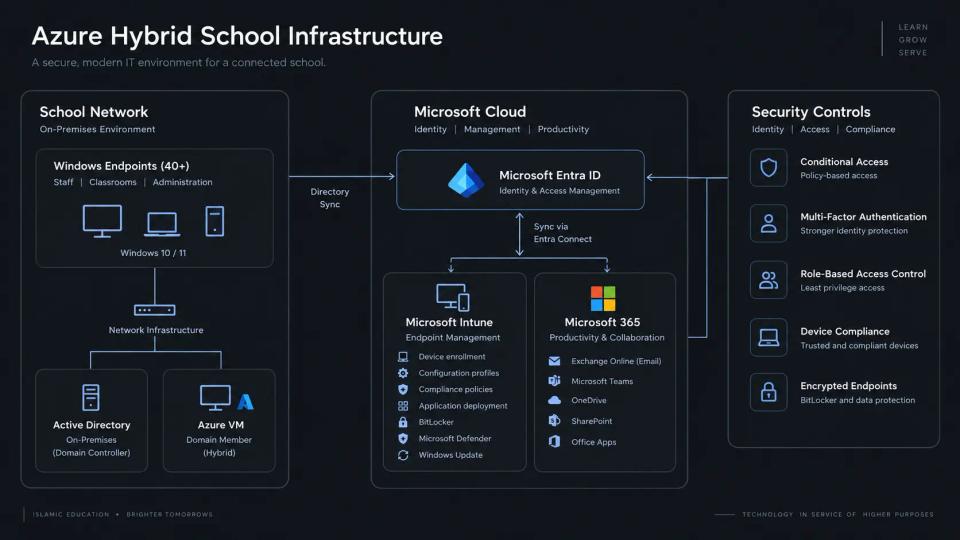
Built a simulated small-business environment to practice deploying and supporting the technology commonly found at a customer site. The lab combined more than 10 Windows endpoints with Windows Server and Active Directory, pfSense, managed switching, VLAN segmentation, VoIP phones, network printers, business applications, and remote administration.
The project covered the full deployment lifecycle: planning the network, configuring infrastructure, provisioning users and workstations, deploying peripherals, validating services, troubleshooting failures, documenting changes, and establishing rollback and escalation procedures.
Objectives
- Deploy a complete small-business network from initial infrastructure through end-user devices.
- Configure Windows Server and Active Directory for centralized identity management.
- Implement routing, DHCP, DNS, firewalling, and VLAN segmentation.
- Configure managed switches and assign endpoints to appropriate networks.
- Deploy and troubleshoot VoIP phones and network printers.
- Provision Windows workstations, user accounts, and business applications.
- Establish secure remote administration for ongoing support.
- Practice systematic troubleshooting across hardware, operating system, and network layers.
- Document installation, validation, rollback, and escalation procedures.
Environment
Infrastructure
- 10+ Windows 11 workstations
- Windows Server with Active Directory Domain Services
- pfSense firewall and router
- Managed Ethernet switch
- VLAN segmentation
- DHCP and DNS
- VoIP phones
- Network printers
- Remote administration tools
Logical Network
Designed the environment around pfSense as the network gateway, with a managed switch providing connectivity and VLAN segmentation for different device types.
The network was logically separated into areas such as:
- Business workstations and servers
- VoIP devices
- Printers and other network peripherals
- Administrative or management access
This provided a realistic environment for testing connectivity between different device types while controlling unnecessary communication between network segments.
Network Deployment
pfSense Gateway
Configured pfSense as the central router and firewall for the environment. It provided gateway services between local VLANs and controlled traffic entering or leaving each network segment.
Configuration included:
- VLAN interfaces
- Interface addressing
- DHCP services
- DNS configuration
- Inter-VLAN firewall rules
- Internet access
- Administrative access controls
After deployment, tested connectivity from each network to verify that approved traffic was permitted while unnecessary cross-network communication remained restricted.
Managed Switching
Configured the managed switch to carry multiple VLANs between pfSense and connected devices.
Ports were assigned according to their purpose. Endpoint-facing ports were configured for the appropriate workstation, VoIP, printer, or management network, while uplink connections carried the VLANs required between network infrastructure devices.
Validated switch configuration by connecting devices to assigned ports and confirming that they received addresses from the expected network.
VLAN Segmentation
Network Separation
Implemented VLANs to reduce the size of the broadcast domain and separate systems according to function.
Segmentation also provided a security boundary between general-purpose workstations and infrastructure or peripheral devices.
Firewall Policy
Configured pfSense rules to control communication between VLANs. Rather than allowing unrestricted traffic between all internal networks, access was limited according to operational requirements.
For example, workstation systems could communicate with required server and printer services while administrative interfaces remained restricted to approved management systems.
Firewall rules were tested after deployment to confirm both permitted and blocked communication behaved as expected.
Windows Server and Active Directory
Domain Services
Deployed Windows Server with Active Directory Domain Services to centralize authentication and user administration.
Created an organizational structure for users, computers, and groups and joined Windows workstations to the domain.
Active Directory administration included:
- Creating user accounts
- Managing passwords and account status
- Creating security groups
- Managing group membership
- Organizing users and computers
- Joining endpoints to the domain
- Troubleshooting authentication problems
DNS
Configured domain DNS to support Active Directory and internal hostname resolution.
Validated DNS functionality using client configuration and command-line tools to confirm endpoints could resolve domain resources correctly.
DNS troubleshooting became particularly important because incorrect client DNS configuration could cause symptoms such as failed domain joins, authentication issues, and inaccessible internal resources despite otherwise functional network connectivity.
DHCP
Configured DHCP scopes to automatically provide endpoints with appropriate IP addressing information.
Validated:
- IP address assignment
- Subnet masks
- Default gateways
- DNS server assignments
- Lease allocation
Created troubleshooting scenarios involving incorrect addressing and DHCP failures to practice distinguishing client-side configuration problems from server or network infrastructure issues.
Workstation Deployment
Windows Provisioning
Prepared more than 10 Windows endpoints for business use.
Workstation deployment included:
- Configuring Windows
- Applying updates
- Setting computer names
- Joining systems to Active Directory
- Verifying domain authentication
- Installing required applications
- Configuring printers
- Testing network access
- Confirming access to required resources
A deployment checklist was used to ensure each workstation received a consistent configuration before being considered ready for use.
User Configuration
Created user accounts and assigned appropriate access based on simulated business roles.
Verified that users could authenticate from assigned workstations, access required network services, print successfully, and use installed applications.
Administrative privileges were kept separate from standard user access where possible to avoid providing unnecessary elevated permissions.
Application Deployment
Installed and configured common workstation applications as part of endpoint provisioning.
Before considering a deployment successful, verified that applications launched correctly under the intended user account and could access any required network resources.
When installations failed, investigated areas such as:
- Administrative permissions
- Windows compatibility
- Installer errors
- Missing dependencies
- Network connectivity
- Existing application versions
- Endpoint security controls
Documented successful installation procedures so the same process could be repeated across additional systems.
Network Printer Deployment
Printer Configuration
Deployed network printers using static or reserved addressing to provide predictable network connectivity.
Configured Windows endpoints to access the printers and validated printing from multiple workstations.
Printer Troubleshooting
Created and resolved scenarios involving:
- Unreachable printers
- Incorrect IP addresses
- Failed print jobs
- Incorrect printer ports
- Driver problems
- Print Spooler failures
- Network connectivity issues
- Incorrect default printer configuration
Used connectivity testing and Windows printer diagnostics to determine whether problems originated from the workstation, Windows printing subsystem, network, or printer itself.
VoIP Deployment
Phone Connectivity
Connected VoIP phones through the managed network and assigned them to the appropriate network segment.
Validated that phones received correct network configuration and could reach required network services.
VoIP Troubleshooting
Simulated common VoIP connectivity problems involving:
- Incorrect VLAN assignment
- DHCP failures
- IP addressing problems
- DNS resolution
- Physical cabling
- Switch port configuration
- Firewall restrictions
- General network connectivity
Troubleshooting VoIP reinforced the importance of validating lower network layers before assuming a problem originated with the phone or VoIP service itself.
Remote Administration
Configured remote access capabilities to support systems after initial deployment.
Remote administration was limited to authorized systems and accounts rather than exposing administrative services broadly across the environment.
Remote support workflows included:
- Connecting to Windows endpoints
- Reviewing system configuration
- Troubleshooting user issues
- Installing approved software
- Running diagnostic commands
- Checking network configuration
- Verifying services after changes
This simulated the transition from initial on-site deployment to ongoing remote IT support.
Troubleshooting
Root-Cause Methodology
Diagnosed and resolved more than 20 intentionally introduced infrastructure and endpoint issues.
Used a systematic troubleshooting process:
- Identify the reported symptoms and affected systems.
- Determine the scope of the failure.
- Check physical connectivity and device status.
- Validate IP addressing and network configuration.
- Test local and remote connectivity.
- Verify DNS and required services.
- Review Windows or device configuration.
- Isolate the most likely root cause.
- Apply the least disruptive corrective action.
- Validate the original service after remediation.
- Document the cause and resolution.
This approach reduced unnecessary configuration changes and made troubleshooting repeatable.
DNS and TCP/IP Issues
Used Windows networking tools including:
ipconfigpingtracertnslookuparpnetstat
Validated IP configuration before testing connectivity by address and hostname. This helped distinguish DNS problems from routing, DHCP, firewall, or physical connectivity failures.
Hardware Issues
Created hardware and physical-layer scenarios involving workstation peripherals, Ethernet connectivity, switch ports, and cabling.
Troubleshooting began with physical inspection and known-good components before progressing into operating system or network configuration.
This prevented software changes from being made when the actual problem existed at the physical layer.
Windows Issues
Investigated Windows problems using tools such as Event Viewer, Device Manager, Task Manager, Services, and command-line utilities.
Reviewed application errors, service state, device status, permissions, and network configuration before determining the appropriate resolution.
Deployment Validation
Post-Installation Testing
Created a validation process to confirm that the environment functioned correctly before considering deployment complete.
Validation included:
- Confirming endpoints received correct IP configuration
- Testing DNS resolution
- Testing Internet connectivity
- Verifying domain authentication
- Confirming access to required network resources
- Testing printer functionality
- Validating VoIP connectivity
- Launching installed applications
- Testing remote support access
- Verifying VLAN and firewall behavior
Testing was performed from the perspective of an end user rather than validating infrastructure configuration alone.
Change and Rollback Procedures
Change Documentation
Documented significant infrastructure changes before and after implementation.
Records included:
- Purpose of the change
- Systems affected
- Existing configuration
- Planned configuration
- Implementation steps
- Validation procedure
- Expected impact
- Rollback procedure
This provided a repeatable process for making changes without relying on memory or undocumented configuration.
Rollback Planning
For changes that could disrupt connectivity or user access, defined a method to restore the previous configuration.
Examples included preserving previous firewall rules, switch configurations, addressing information, or Windows settings before making changes.
If validation failed after a change, the previous configuration could be restored before continuing troubleshooting.
Escalation Procedures
Documented when an issue should be escalated rather than continuing troubleshooting indefinitely.
Escalation notes included:
- Original symptoms
- Affected users and systems
- Business impact
- Troubleshooting already completed
- Diagnostic results
- Configuration changes attempted
- Relevant logs or error messages
- Current system state
This ensured another technician could continue troubleshooting without repeating the same diagnostic work.
Security Controls
Applied basic security principles throughout the environment:
- Segmented device types using VLANs.
- Restricted inter-VLAN traffic with pfSense firewall rules.
- Used centralized Active Directory accounts for authentication.
- Separated standard user and administrative access.
- Limited access to network infrastructure management interfaces.
- Restricted remote administration to authorized accounts and systems.
- Avoided exposing unnecessary network services.
- Maintained documented configuration and rollback procedures.
These controls provided layered protection while preserving the connectivity required for normal business operations.
Challenges and Lessons Learned
Troubleshooting Across Multiple Layers
The same user-facing symptom could originate from several different parts of the environment. A workstation unable to reach a server, for example, could have an incorrect VLAN, invalid DHCP configuration, DNS failure, firewall restriction, physical connection problem, or Windows configuration issue.
Working from the physical and network layers upward made troubleshooting more predictable and reduced unnecessary changes.
Managing Dependencies
Active Directory, DNS, DHCP, routing, switching, and endpoint configuration were closely connected. Incorrect DNS settings could appear to be an authentication problem, while an incorrect switch port could resemble a DHCP failure.
The lab demonstrated the importance of understanding service dependencies rather than troubleshooting each technology independently.
Validating the Entire User Workflow
A technically correct infrastructure configuration did not necessarily mean the deployment was complete. Testing authentication, applications, printers, VoIP, and network resources from an endpoint exposed issues that infrastructure-level testing alone could miss.
Planning for Failed Changes
Creating rollback procedures before making configuration changes reduced the risk of extended outages. This reinforced the importance of treating implementation, validation, documentation, and recovery as parts of the same deployment process.
Results
- Deployed a simulated small-business environment with more than 10 Windows endpoints.
- Configured Windows Server and Active Directory for centralized identity and computer management.
- Implemented pfSense routing, firewalling, DHCP, DNS, and VLAN segmentation.
- Configured managed switching for workstation, VoIP, printer, and management connectivity.
- Deployed and tested network printers and VoIP phones.
- Provisioned domain-joined Windows workstations, user accounts, applications, and remote support access.
- Diagnosed and resolved more than 20 DNS, DHCP, TCP/IP, printer, VoIP, hardware, and Windows issues.
- Applied systematic root-cause troubleshooting across physical, network, operating system, and application layers.
- Created installation, validation, rollback, and escalation procedures for infrastructure changes.
- Developed hands-on experience with end-to-end small-business infrastructure deployment and on-site technical support.